Why answers from your own saves differ from a general chatbot's
By Imran6 min read
On this page
Ask a general chatbot about a paper you read last month and you will usually get a fluent answer. Whether it came from that paper is another question. Unless you paste it in, the chatbot has never seen your copy, your highlights or the lecture where the professor explained it. It answers from what it absorbed in training, and when that runs out, it can fill the gap with something that sounds right.
AI answers from your own documents work the other way round. The tool searches what you saved first, writes the answer from the passages it found, and shows you which ones it used. This post covers where each kind of answer comes from, why chatbots sometimes invent sources, what answering from your saves fixes and what it doesn't, and how to check an answer in about a minute.
What does a general chatbot answer from?
A general chatbot is built on a language model trained on a very large amount of text. It learns the patterns in that text, then writes the most likely continuation of your question. That is why it explains well-known ideas so smoothly, and why it knows nothing about the PDF you downloaded on Tuesday.
When what it learned runs thin, the model still writes fluent text. The US National Institute of Standards and Technology calls this confabulation in its 2024 profile of generative AI risks: confidently stated content that is wrong or false. NIST describes it as a natural result of how these models are designed, since they generate text that imitates the patterns of what they were trained on.
Many chatbots can now search the web or read a file you upload, and they show links when they do. That helps. But a web search looks at the whole internet, not at the reading you chose, and when nothing turns up, many will still answer from memory.
Why do chatbots make up sources?
In 2023, William Walters and Esther Isabelle Wilder asked two versions of a popular chatbot to write short literature reviews on 42 topics. They then checked every one of the 636 references by hand, and published the results as a study in Scientific Reports.
55% of the older version's references and 18% of the newer version's were fabricated: papers that do not exist.
Among the references to real papers, 43% and 24% had substantive errors, such as the wrong details for the work cited.
The reason is not mysterious. A reference is a pattern: authors, a year, a title, a journal, a page range. A model that writes patterns can write a very convincing one. For a student or a researcher, this is the worst kind of mistake, because a fake reference looks exactly like a real one until you search for it.
What changes with AI answers from your own documents?
The research name for the approach is retrieval-augmented generation. A 2020 paper by Patrick Lewis and colleagues introduced the term: first retrieve passages from a collection of documents, then generate the answer from them. Among the problems it set out to address, the authors named giving the model's answers a traceable origin.
When the collection is your own saves, three things change:
Where it looks. The papers, lecture notes and articles you chose to keep, not the whole internet.
What it shows. A numbered source next to each claim, so you can open the passage it came from.
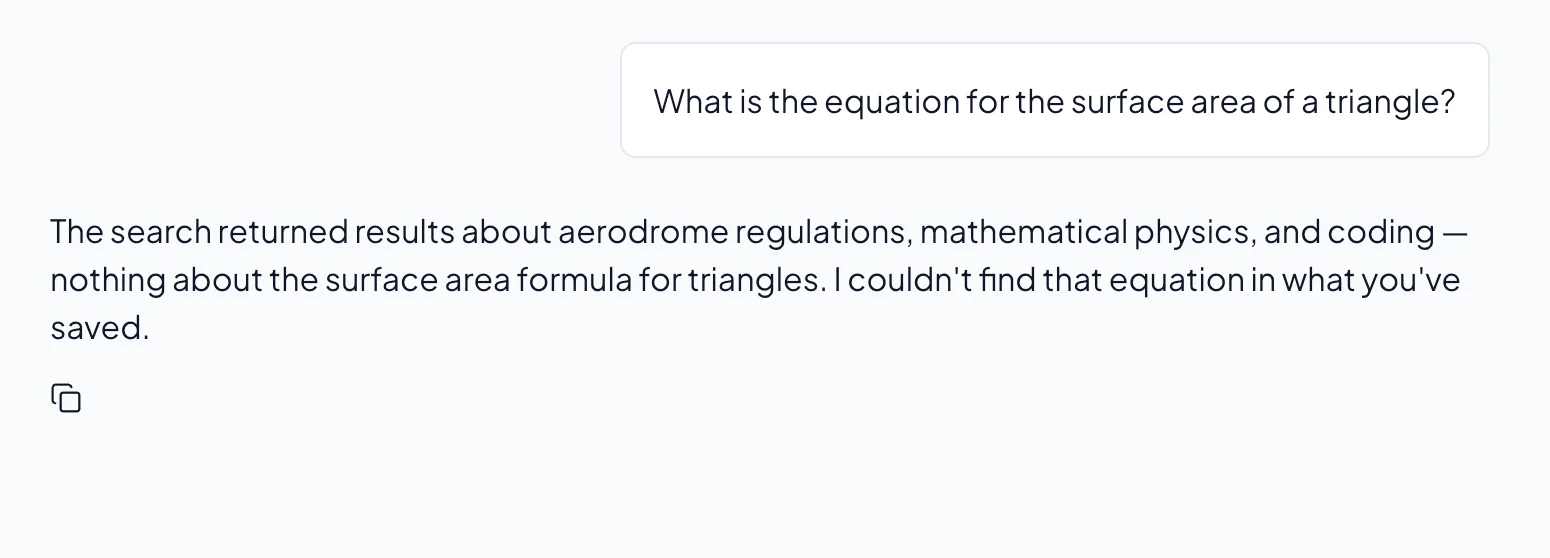
What it does when nothing matches. It says so, instead of filling the gap.
The third one is the one people underrate. "I couldn't find that in what you've saved" tells you the gap is in your reading, not in the AI's memory. It is less impressive than a confident paragraph. It is also true.
Does answering from your own saves make every answer right?
No, and it is worth being plain about that. In a preregistered study, Varun Magesh and colleagues at Stanford tested AI research tools sold to lawyers, which answer from case law and cite it, as this kind of tool does. Their providers had described them as avoiding or eliminating made-up answers. The study, published in 2025, found the tools made fewer of them than a general chatbot, and still produced made-up answers between 17% and 33% of the time.
Two lessons carry over to your own reading:
Answering from a set of documents reduces errors. It does not remove them. The model can still misread a passage or stretch it.
The numbered sources are what let you catch the rest. An answer you can check is worth more than an answer that merely sounds sure.
An answer is also only as good as what you saved. If the one source on a question is a weak blog post, the answer will cite a weak blog post.
How to check an AI answer in a minute
Look for a source on every claim. A sentence with no number is the AI talking, not your saves.
Open one source and read the passage. Does it say what the answer says, or something close but different?
Check what the source is. A preprint you saved in March may not match the version that was published.
Ask a narrower question. "What did the 2019 paper find about sleep and recall?" beats "Tell me about memory."
Treat "nothing found" as information. Save the missing paper, or ask in different words.
Where Relic AI fits
We built Relic AI to answer from your saves and nothing else. It is the habit above, with the tedious parts done for you.
Only your Library. Ask Relic answers from the links, papers, PDFs, notes and YouTube videos you saved (videos through their captions, where they have them). It won't answer from general knowledge, even when the question sounds general.
Numbered sources. Every claim carries a number, and each number opens the passage it came from.
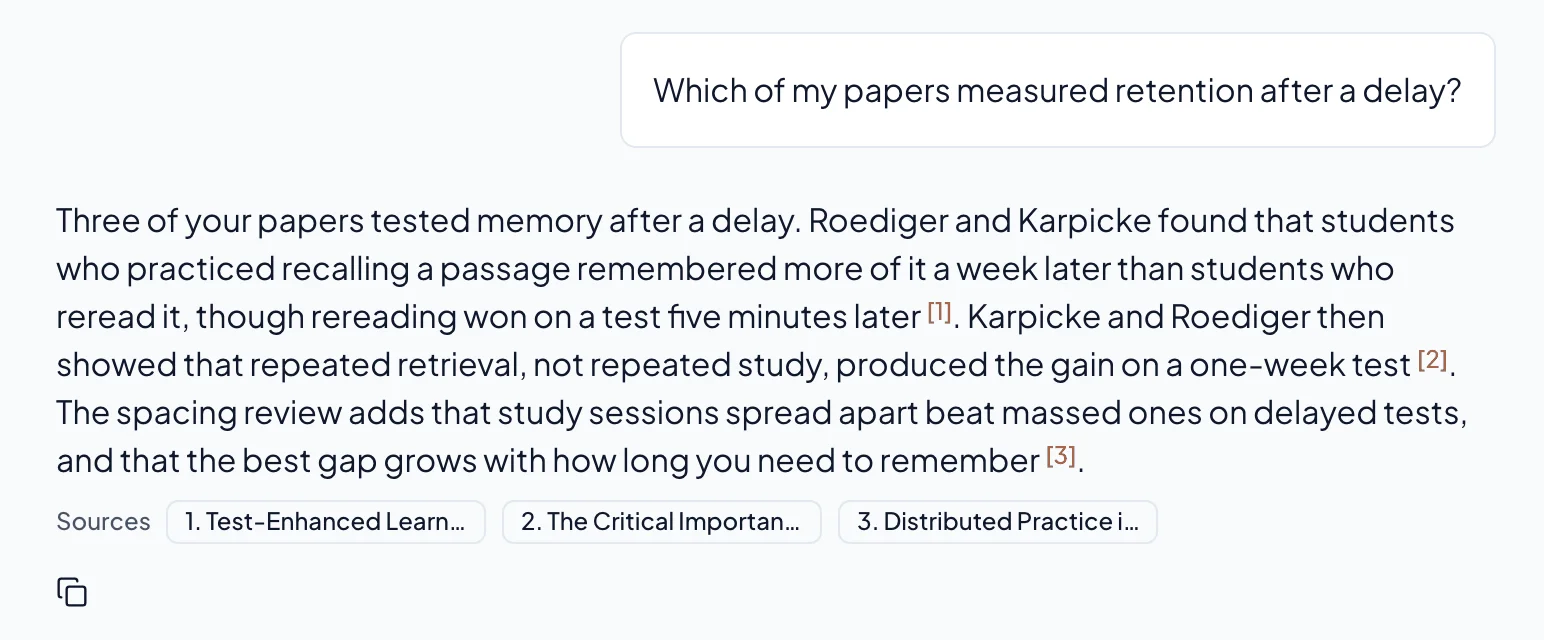
An honest "nothing found". When nothing relevant is saved, Ask Relic says so.
One paper, or a few. Pin up to five saves to a question with @-references when you want an answer from those alone.
Search by meaning. Relic AI searches by keyword and by meaning, so it finds the passage even when you don't remember its exact words.
If your saves are mostly browser bookmarks, the guide to chatting with your bookmarks shows how to bring them in. If you are starting a literature review, read how to organize papers for a literature review first: it is easier to ask good questions of a reading list that has some order to it.
Questions people ask about AI answers from your own documents
Is this the same as uploading a file to a chatbot?
It is close for one file and one conversation. The differences show up over a semester: you don't upload the same papers again for every question, the AI searches everything you have saved at once, and it stays inside your saves rather than reaching for what it learned in training. If you use a chatbot this way, check what it does when your files are silent.
Can it answer questions about things I haven't saved?
Not in Relic AI, by design. If the answer isn't in your Library, Ask Relic tells you, and you can save a source and ask again.
Will it still make mistakes?
Sometimes. The model can still misread a passage or join two ideas a source keeps apart. That is why every claim has a number. Open the source before you quote it in an essay.
Do I have to organize my files first?
No. Every save gets a summary, key takeaways, a category and tags automatically, and the search works across all of it. Order helps you browse; it isn't needed for asking.
What to do this week
Pick a question you would normally ask a chatbot about your coursework or research. Ask it of the five papers you have actually read instead, and open two of the sources it gives you. You will know quickly which kind of answer you would rather put your name to.
Relic AI is free during the beta. If you want to try it on your own reading, join Relic.