How to organize papers for a literature review before you start writing
By Imran4 min read
On this page
It usually starts with good intentions. A folder called "lit review", a few papers you meant to read properly, then forty more downloaded late at night because the titles looked relevant. Three weeks later the chapter is due, and you know one of those papers said exactly what you need. You just don't know which one.
This post is a practical way to organize papers for literature reviews before you start writing, so the pile turns into themes you can write from. It works alongside whatever reference manager you already use, and it shows where Relic AI fits without asking you to change how you cite.
Why a folder of PDFs stops working
A folder sorts papers by when you downloaded them, or by whatever the file happened to be called. Neither is how a literature review is read. Your reader wants to know what the field agrees on, where it disagrees, and what nobody has tested yet.
Library and writing-center guides put it plainly: a literature review is organized by theme, not by source. If your notes are organized by source, every paragraph turns into a book report about one paper, and the actual synthesis gets left for the very end, usually at 1 a.m.
How to organize papers for literature reviews, step by step
The steps below take an evening to set up and a few minutes a week after that. None of them needs special software, and each one makes the next easier.
1. Decide what you are actually asking
Before sorting anything, write down the two to five questions your review has to answer. For a thesis chapter, they usually come straight from your research questions. For a course paper, they come from the prompt.
These questions become your themes. A paper earns its place in the review by speaking to at least one of them, and a paper that speaks to none of them can wait.
2. Give every paper one home
Papers scattered across Downloads, email attachments and a dozen browser tabs are papers you will forget you have. Pick one place where every paper ends up, and save to it the moment you find something, not when you finally have time to read it.
Keep your reference manager for what it does well: citation details and your bibliography. The one home here is about reading and finding, not about formatting citations.
3. Write one line per paper
For each paper, write a single line: what it claims, how it got there, and which of your questions it answers. One line is enough to remember why you saved it. Three paragraphs is a summary you will never reread.
If you like grids, this is the idea behind a synthesis matrix: your sources down one side, your themes across the top, and a short note wherever a paper speaks to a theme. The point is to see where sources overlap and where they disagree before you write a word of the review.
4. Group by theme, not by author
Now sort the one-liners under your questions. Most papers land under one theme. A few land under two, and those are often the ones your argument hinges on. A theme with nothing under it is either a gap in the literature or a gap in your reading, and it is worth knowing which.
When you start writing, each theme becomes a section, and each section cites several papers at once. That is what synthesis looks like on the page.
What your reference manager should keep doing
A reference manager stores citation details, formats your bibliography and puts citations into your document. Keep using it for exactly that. Nothing in this routine replaces it.
What it does less well is remember what a paper argued, or answer "which of my papers disagreed with this?" three weeks later. That part is reading and recall, and it is where most of the lost time in a literature review goes.
Where Relic AI fits in a literature review
Relic AI is an AI second brain for the things you save. In the routine above, it takes care of steps 2 and 3 and helps with step 4.
One home for every paper. Upload a PDF in the web app, or save a PDF open in a browser tab with the Chrome extension (desktop Chrome and other Chromium browsers). Relic reads text-based PDFs. A scanned PDF that is only images is kept, but its text isn't read yet.
A summary and key takeaways for every save. Each paper gets a summary, key takeaways, a category and tags, automatically. You can rewrite any of them, and Relic keeps what you wrote.
Questions across your papers. Ask your Library a question, and Ask Relic answers only from what you saved, with numbered sources that link back to the passages it used. When nothing you saved covers the question, it says so.
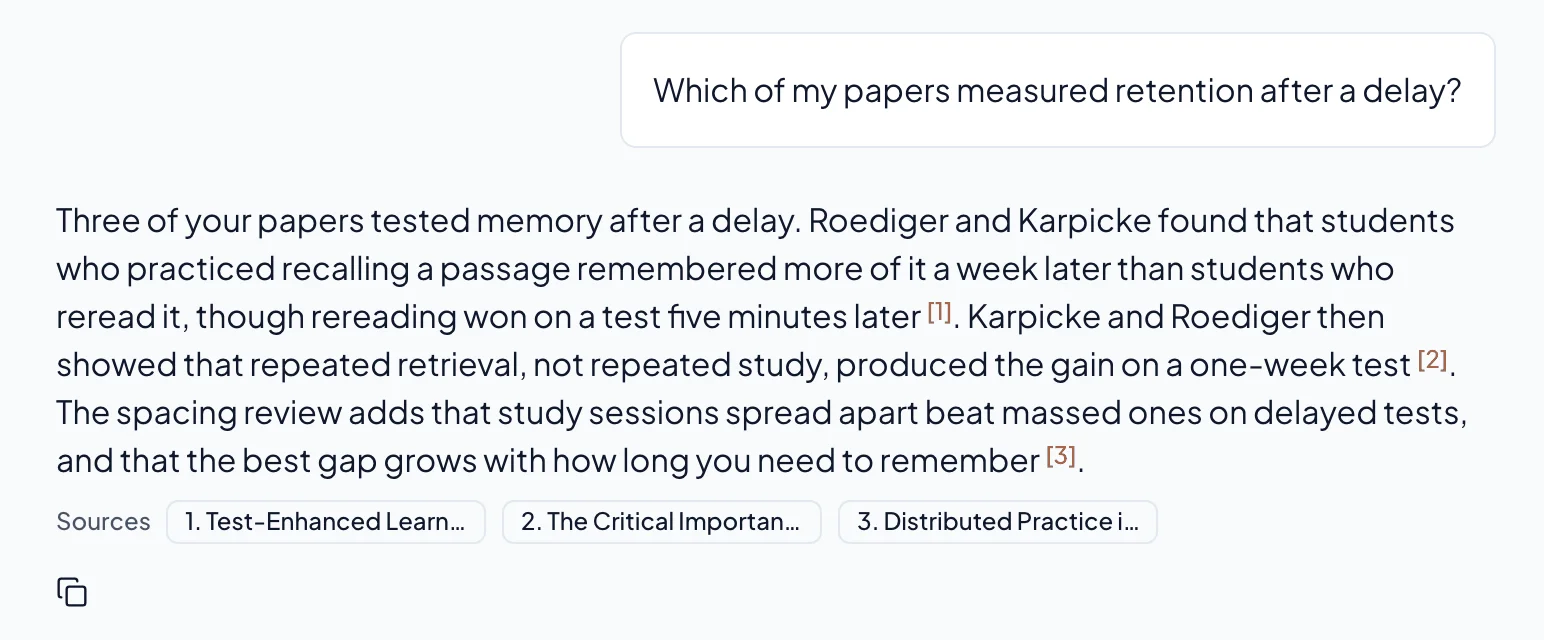
That last point is the step a folder can't do. A question like "which of my papers measured this after a delay?" is one you would otherwise answer by opening every PDF again. For the longer version of how this works, read what an AI second brain is, or how asking your saves a question comes back with sources.
What to do this week
Write down the questions your review has to answer.
Move every paper you have already downloaded into one place.
Write one line for the five papers you are most likely to cite.
Ask one question across them, and look at which papers come back.
It's a beta, so expect a few rough edges. If a Library that answers back sounds useful for your next chapter, join Relic below. It's free during the beta.