Why you save things and never read them, and what helps
By Sara6 min read
On this page
You find something good. An article that explains the thing you were stuck on, a lecture you mean to watch before the exam, a recipe someone posted on Instagram. You save it for later, and it feels like you did something. Then it sits in your bookmarks, your read-later list or your Watch Later queue. A month later you need it, and you can't find it.
If you save things and never read them, you are not lazy and you are not alone. Saving and getting back to what you saved are two different jobs, and a bookmark only does the first one. This post looks at why the pile grows, what a study of bookmarks actually found, and a small weekly habit that gets your saves read when you need them.
Why do you save things and never read them?
Because saving feels like progress. One click, and the article is "handled". The problem is that the click only answers where the thing is, and only for as long as you remember saving it. It never answers when you will read it, or why you wanted it.
Christian Tietze named this in 2014 as the collector's fallacy: "to know about something" isn't the same as "knowing something". A full folder of saved articles tells you that you once found the material. It tells you nothing about what is in it.
There is a word for the paper version too. Tsundoku is the Japanese term for books and letting them pile up unread. The browser just made the pile weightless, so it can grow forever without anyone tripping over it.
Is it digital hoarding?
Psychologists study the far end of this habit under the name digital hoarding: piling up files, emails and saves, and finding it hard to let any of them go. In 2019 a Northumbria University team led by Nick Neave published a questionnaire to measure digital hoarding behaviours, and in a survey of over 400 employees the same group found many people kept emails and files indefinitely.
A long read-later list doesn't make you a hoarder. The mechanism is the same, though: keeping things is easy, and deciding about them is the work that keeps getting put off.
Do people actually use their bookmarks?
In 2020, researchers Ofer Bergman, Steve Whittaker and Joel Schooler tested how people refind websites they had bookmarked. They published it as "Out of sight and out of mind: Bookmarks are created but not used" in the Journal of Librarianship and Information Science. Fifty participants were asked to find 21 websites each, and five of those were pages they had bookmarked themselves, mixed in at random so nobody knew which.
The results are a little humbling:
Only 41 of the 250 bookmarked pages (16%) were found through the bookmarks at all.
Only 9 (4%) were found by opening the bookmarks menu and its folders. The other 32 were sitting in the bookmarks bar, in plain view.
For sites people had visited, bookmarking a page did not make it easier to find again than not bookmarking it.
The authors' reading is simple: unless a bookmark was highly visible, people did not use it. Read plainly, the folders you file things into are where saves go to be forgotten. The pile isn't failing because you saved the wrong things. It is failing because nothing brings them back into view.
How to actually read what you save
You don't need a stricter system. Tidier folders are still folders, and the study suggests folders are exactly where things vanish. What helps is making each save easy to recognize later, and putting a few of them back in front of you on a schedule.
1. Save it with a reason
When you save something, add one line on why: the course, the essay, the question it answers. Six weeks from now, "useful article" means nothing. "The counterargument for my second section" means a lot.
2. Keep bookmarks, read-later links and tabs in one place
Saves spread across browser bookmarks, a read-later app, email to yourself, saved posts and forty open tabs are saves you will forget you have. Pick one place where everything goes, and make it somewhere you actually look, not a menu three folders deep.
3. Give "later" a date with a weekly review
Once a week, set aside fifteen minutes to look at what came in. Don't try to read it all. Pick the two or three saves that matter for what you are working on now, and read those.
4. Let some saves go
Some things were only interesting for a minute. Marking them done is not failure, it is the habit working. A shorter reading list you trust beats a long one you avoid.
5. Ask before you scroll
When you need something back, the question in your head is usually "what did that article say about X?", not "what was the title?". If your tool can answer that question from your own saves, you don't have to remember where you put anything.
Where Relic AI fits
We built Relic AI because we kept losing things too. It does the parts of this routine that are a chore, so the habit takes minutes instead of an evening.
A reason, written for you. Every save gets a summary, key takeaways, a category and tags automatically, so six weeks later you can see what it was and why it mattered. You can edit any of them.
One place. Save a page, a PDF or a YouTube video in one click with the extension for desktop Chrome, or bring in your browser bookmarks, your open tabs and your Watch Later list. Everything lands in your Inbox, then your Library.
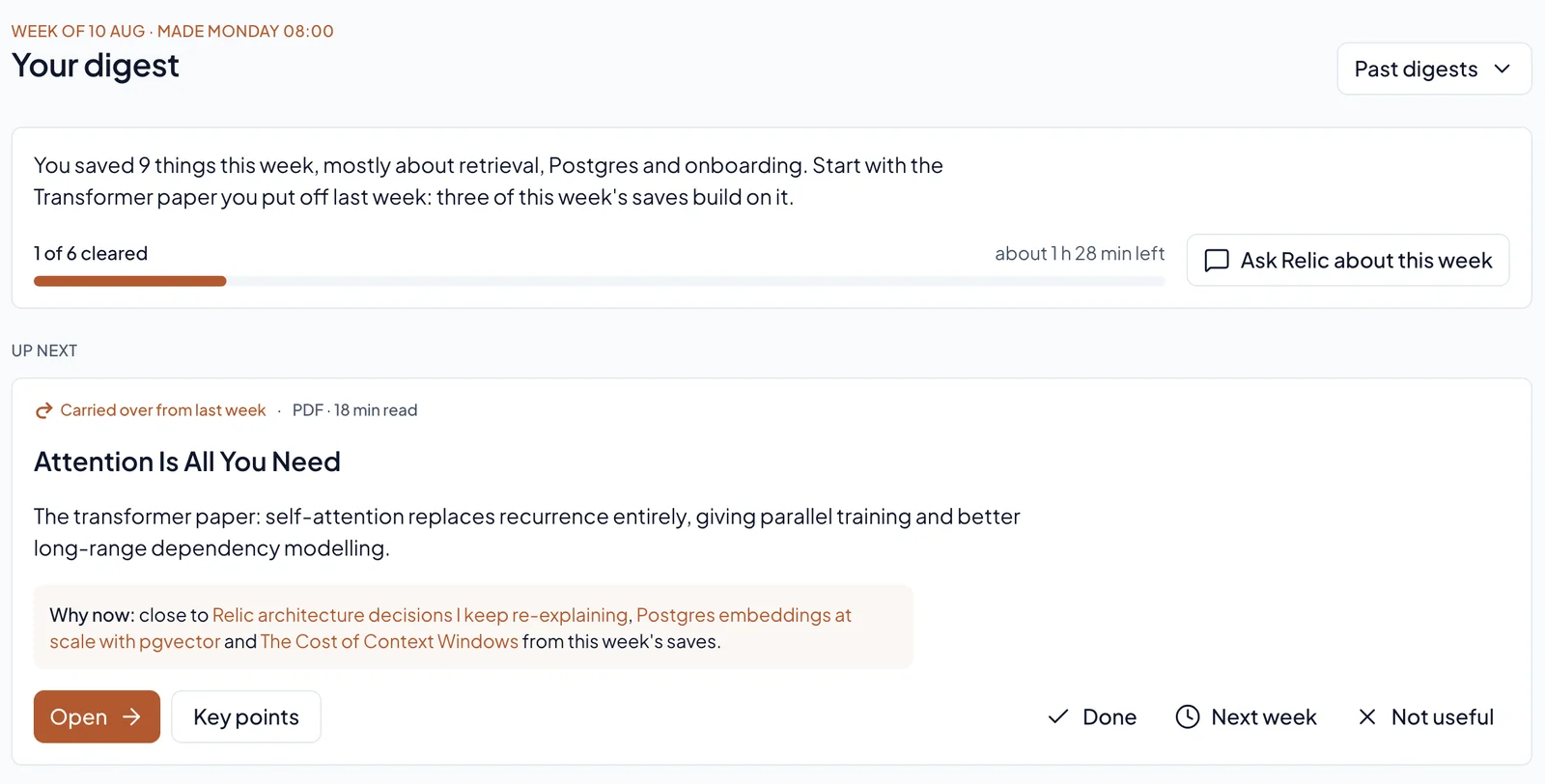
"Later" with a date. The weekly Digest picks the saves worth reading next, on the weekday and hour you choose. You mark each one done, push it to next week, or say it's not useful.
Ask instead of scroll. Ask Relic answers only from your saves, with numbered sources you can open. When nothing relevant is saved, it says so.
Related saves. Each save shows the others in your Library that cover the same ground, so one find can bring back others.
If you want the bigger picture first, read what an AI second brain is, or see how it works to chat with your bookmarks. If you are moving off a read-later app, the Pocket alternative guide covers that switch.
Questions people ask about unread saves
Is it bad to have hundreds of unread bookmarks?
Not on its own. Unread bookmarks cost nothing until you need one and can't find it. The study above suggests that is the real cost: a page you bookmarked was no easier to find again than one you didn't. The fix is a way back to your saves, not fewer of them.
Should I delete my read-later list and start over?
You can, and some people feel lighter for it. A gentler option is to keep the list but stop treating it as a to-do list. Review a few saves a week, mark the stale ones done, and let search or a question bring back the rest when you need them.
How do I organize bookmarks so I actually use them?
Keep the few you open every day in the bookmarks bar, which is where the study found people really did use them. For everything else, folders matter less than being able to find a save by what it says. Add a line on why you saved it, or use a tool that summarizes and tags each save for you.
Why do I keep tabs open instead of bookmarking them?
Often because an open tab stays in view, and a bookmark disappears into a menu. It is the same visibility effect the study found. Saving the tabs to one place you review each week gives you the visibility without the forty tabs.
What to do this week
Pick the pile that bothers you most: the bookmarks bar, the Watch Later list, or the tabs you have been keeping open "for later". Move it into one place. Next week, spend fifteen minutes on it and read two things. It is a small test, and you will know quickly whether it sticks.
Relic AI is free during the beta. It's a beta, so expect a few rough edges. If that sounds useful, join Relic.